
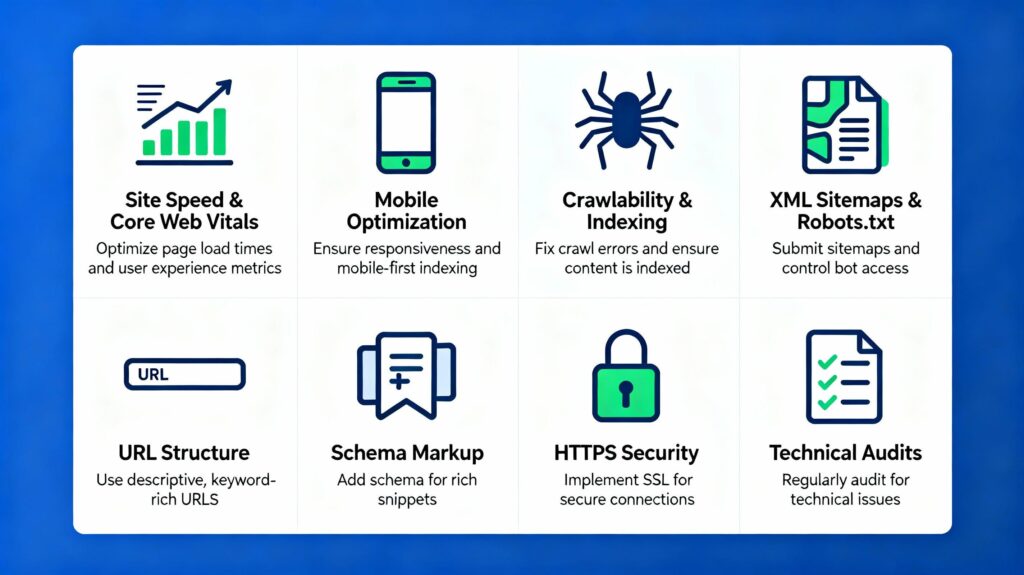
Technical SEO is the process of improving a website’s technical foundation so search engines can discover, crawl, render, and index its content effectively.
It covers website architecture, indexing, XML sitemaps, robots.txt, canonical URLs, redirects, structured data, website performance, and security. Understanding these fundamentals helps you identify technical issues that may prevent search engines from accessing or properly understanding your pages.
This guide explains the essential concepts and provides a practical checklist for improving the technical SEO of your website, including WordPress websites.
What Is Technical SEO?
Technical SEO focuses on making a website accessible to search engines while maintaining a reliable and usable experience for visitors.
| SEO Area | Main Focus |
|---|---|
| Technical SEO | Crawling, indexing, site architecture, performance, and structured data |
| On-Page SEO | Content, headings, keywords, titles, and internal links |
| Off-Page SEO | Backlinks, reputation, and external references |
Technical SEO does not guarantee higher rankings. It helps establish the conditions that allow search engines to access and process your content correctly.
How Search Engines Process Your Website
- Crawling: Search engines discover URLs and request their content.
- Rendering: They process page resources, including JavaScript when necessary.
- Indexing: They analyze the content and determine whether it should be included in the index.
- Serving results: Relevant pages may be selected for search results based on the query and other signals.
A page can be crawled without being indexed, and indexing does not guarantee strong rankings. Understanding these distinctions is essential when diagnosing SEO problems.
1. Set Up Google Search Console
Google Search Console is one of the most useful free tools for monitoring your website’s presence in Google Search.
Use it to:
- Monitor clicks, impressions, and search queries.
- Review page indexing reports.
- Inspect individual URLs.
- Submit XML sitemaps.
- Monitor Core Web Vitals and HTTPS reports where available.
- Investigate security issues and manual actions.
Practical tip: If an important page does not appear in Google, inspect its URL in Search Console before making changes. Review the reported indexing status and any available crawl information.
2. Create an XML Sitemap
An XML sitemap lists URLs that you want search engines to discover. It is particularly useful for large websites, new websites, and sites with complex structures.
Your sitemap should:
- Include important, indexable canonical URLs.
- Exclude URLs that should not appear in search results.
- Be accessible to search engines.
- Be updated as your site changes.
- Be submitted through Google Search Console.
WordPress and many SEO plugins can generate XML sitemaps automatically. Remember that submitting a sitemap is a discovery hint, not a guarantee that every listed URL will be indexed.
3. Configure Robots.txt Correctly
The robots.txt file provides crawling instructions to search engine bots. It is typically available at /robots.txt on your domain.
Review this file to ensure you have not accidentally blocked important pages or resources.
Important: Robots.txt is not a reliable method for keeping a URL out of Google’s index. If a page must be excluded from search results, a properly implemented noindex directive or access restriction may be more appropriate.
4. Check Indexing Controls
Important pages should be accessible to crawlers and should not accidentally contain a noindex directive.
Check the following when a page is missing from search results:
- Does the URL return a successful response?
- Is crawling blocked by robots.txt?
- Does the page contain a noindex directive?
- Is the page linked from other relevant pages?
- Does Search Console report indexing or canonicalization issues?
On WordPress sites, review SEO plugin settings for individual pages, posts, categories, tags, and custom post types.
5. Build a Logical Website Structure
A clear site structure helps visitors navigate your website and helps search engines discover relationships between related pages.
For example, a technical SEO content cluster might contain:
- Technical SEO
- Beginner’s Guide to Technical SEO
- XML Sitemap Guide
- Robots.txt Guide
- Canonical URLs Explained
- Structured Data Guide
Keep important pages easy to discover through navigation, category pages, and contextual internal links. Avoid creating unnecessary layers that make useful content difficult to reach.
6. Improve Internal Linking
Internal links help search engines discover pages and understand how content relates across your website.
Link relevant articles to their supporting guides, pillar pages, service pages, and case studies. Use descriptive anchor text that explains what readers can expect.
For example, use WordPress website performance guide rather than relying on generic anchor text such as “click here.”
7. Use Clear, Consistent URLs
Descriptive URLs help users understand a page’s topic and make website structures easier to manage.
For example:
/beginners-guide-to-technical-seo/
Good URL practices include:
- Use descriptive words.
- Separate words with hyphens.
- Avoid unnecessary parameters and identifiers.
- Maintain a consistent URL structure.
- Avoid changing established URLs without a clear reason.
If a URL needs to change, plan appropriate redirects and update internal links and sitemap entries.
8. Manage Canonical URLs
Canonicalization helps search engines identify the preferred URL when the same or substantially similar content is available at multiple addresses.
For example, tracking parameters may create URLs that display the same page with different query strings.
Use canonical tags where appropriate and keep canonical signals consistent with redirects, internal links, and sitemap entries.
A canonical tag is a signal rather than an absolute instruction; search engines may select a different canonical URL based on their assessment of the available signals.
9. Handle Redirects Properly
Redirects send visitors and crawlers from one URL to another.
- 301: Generally used for a permanent move.
- 302: Generally used for a temporary move.
When possible, redirect old URLs directly to their final destinations instead of creating chains such as URL A → URL B → URL C.
Check redirects carefully during website migrations, permalink changes, domain changes, and content consolidation.
10. Find Broken Links and HTTP Errors
Broken internal links create a poor user experience and can make important content harder to discover.
Common HTTP status codes include:
| Status | Meaning |
|---|---|
| 200 | Successful response |
| 301 | Permanent redirect |
| 302 | Temporary redirect |
| 404 | Resource not found |
| 410 | Resource permanently gone |
| 500 | Server error |
| 503 | Service temporarily unavailable |
Investigate unexpected errors affecting important pages. Do not redirect every missing URL to the homepage; use a redirect when a relevant replacement exists.
11. Use HTTPS and Maintain Website Security
HTTPS protects data exchanged between the website and its visitors. Security maintenance also helps prevent compromised pages, malicious redirects, injected spam, and availability problems.
Check that:
- Your SSL/TLS certificate is valid.
- HTTP URLs redirect appropriately to HTTPS.
- Canonical URLs use your preferred HTTPS version.
- WordPress, themes, and plugins are maintained.
- Backups are available and recoverable.
- Suspicious traffic and security issues are monitored.
12. Optimize Website Performance
Website performance affects how quickly visitors can access content and interact with your pages. It is also part of Google’s broader page-experience guidance.
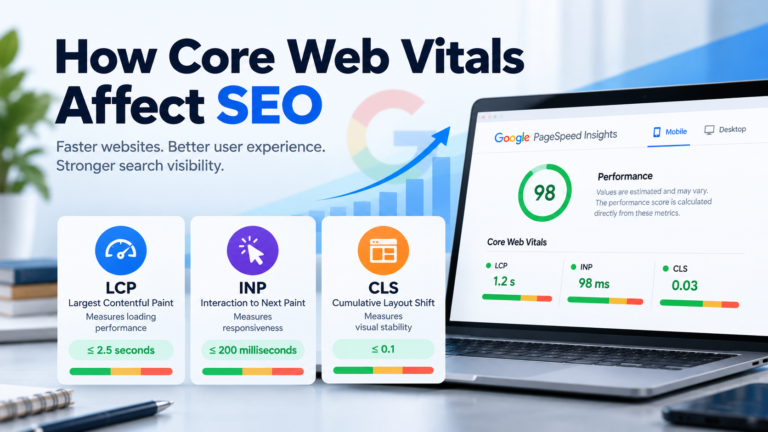
Core Web Vitals measure three important aspects of user experience:
- Largest Contentful Paint (LCP): Loading performance.
- Interaction to Next Paint (INP): Responsiveness to interactions.
- Cumulative Layout Shift (CLS): Visual stability.
Review image sizes, caching, server response times, JavaScript, CSS, and third-party scripts when investigating performance problems.
Read Why Website Speed Matters More Than Ever for a deeper look at performance optimization.
13. Make the Website Mobile-Friendly
Check that your website works well across different screen sizes and devices.
- Use responsive layouts.
- Keep text readable.
- Make navigation and controls easy to use.
- Optimize images for mobile screens.
- Ensure important content is accessible.
- Test loading and interaction performance.
Google primarily uses the mobile version of a site’s content for indexing, so ensure that mobile users and crawlers can access the important content available on desktop.
14. Implement Structured Data
Structured data provides machine-readable context about a page or entity. Depending on the website, relevant types may include Organization, Article, Breadcrumb, Product, Event, and LocalBusiness.
Use structured data only when it accurately describes the page and follows the relevant search engine guidelines.
Validate supported implementations using Google’s Rich Results Test and monitor eligible enhancements in Search Console when available.
Structured data can make pages eligible for certain search features, but it does not guarantee enhanced results or higher rankings.
15. Manage Duplicate Content and WordPress Archives
Duplicate or near-duplicate URLs can arise from query parameters, filters, archive pages, URL variations, and other site features.
WordPress can automatically generate categories, tags, author archives, date archives, search pages, and custom taxonomy archives.
Review which pages provide genuine value and which create unnecessary duplication. Depending on the situation, solutions may include canonical URLs, redirects, noindex directives, or improvements to internal linking.
Do not exclude an archive automatically. A well-maintained category page can be useful for visitors and search engines.
16. Check JavaScript and Crawlable Links
Google can render JavaScript, but complex implementations can still introduce crawling, rendering, and performance challenges.
For JavaScript-powered websites, verify that:
- Important content is available when the page is rendered.
- Internal links use crawlable link elements.
- Important pages have their own URLs.
- Required resources are accessible.
- Rendering does not introduce unnecessary delays.
This is particularly relevant to custom WordPress development, dynamic interfaces, and websites that rely heavily on client-side rendering.
17. Technical SEO for WordPress Websites
WordPress simplifies many SEO tasks, but its flexible architecture requires careful configuration.
Include these items in a WordPress technical SEO audit:
- Permalink settings.
- SEO plugin configuration.
- XML sitemap and robots.txt.
- Categories, tags, and custom taxonomies.
- Custom post types.
- Canonical URLs and redirects.
- Pagination and archive pages.
- Plugin-generated URLs and metadata.
- Website performance and security.
For custom-built WordPress functionality, also review REST API integrations, dynamic content, and templates to ensure important content remains accessible and discoverable.
Technical SEO Checklist
Crawling and Indexing
- Google Search Console is configured.
- Important pages are indexable.
- Robots.txt is reviewed.
- An accurate XML sitemap is available.
- Important pages have internal links.
URLs and Architecture
- URLs are descriptive and consistent.
- Navigation is logical.
- Canonical URLs are appropriate.
- Redirects work correctly.
- Broken internal links are fixed.
- Duplicate URL variations are controlled.
Performance and Security
- Core Web Vitals are monitored.
- Images and scripts are optimized.
- HTTPS is configured correctly.
- Software is maintained.
- Backups and security monitoring are in place.
Structured Data
- Relevant markup is implemented where appropriate.
- Markup matches visible page content.
- Supported structured data is validated.
Technical SEO Tools for Beginners
- Google Search Console: Search performance, indexing, sitemaps, and reported issues.
- Google PageSpeed Insights: Performance diagnostics and Core Web Vitals insights.
- Chrome DevTools: Network requests, JavaScript, CSS, and rendering diagnostics.
- Rich Results Test: Validation of supported structured data.
- Website crawlers: Large-scale checks for broken links, redirects, metadata, and canonical issues.
A Practical Technical SEO Workflow
- Verify your website in Google Search Console.
- Inspect important URLs and indexing status.
- Review your XML sitemap and robots.txt.
- Crawl the website to identify technical errors.
- Check redirects, canonicals, and internal links.
- Review mobile usability and performance.
- Validate relevant structured data.
- Fix high-impact problems first.
- Monitor changes and test the website after updates.
Prioritize issues that prevent access to important content, cause incorrect indexing, compromise security, or significantly affect user experience. Not every warning from an automated tool requires immediate action.
Frequently Asked Questions
What is technical SEO in simple terms?
Technical SEO improves the website infrastructure that allows search engines to discover, process, and index content effectively.
Do I need coding skills to learn technical SEO?
No. You can learn the fundamentals using WordPress and SEO tools. Coding becomes more useful for JavaScript SEO, custom development, server configuration, and complex technical issues.
Does technical SEO guarantee higher rankings?
No. It helps search engines access and understand your website, but rankings also depend on relevance, content quality, competition, and other signals.
Is an XML sitemap required?
Not every website needs a sitemap to be discovered, but it can help search engines find important URLs, particularly on larger or newer websites.
What is the difference between robots.txt and noindex?
Robots.txt controls crawling access. A noindex directive tells search engines not to include a page in their index when they can access and process that directive.
How often should I audit technical SEO?
Perform periodic audits and review Search Console regularly. Larger or frequently updated websites may benefit from more continuous monitoring.
Final Thoughts
Technical SEO is easier to manage when you focus on the fundamentals: crawlability, indexing, site architecture, URLs, internal linking, performance, structured data, and security.
Start by making sure search engines can access the pages that matter, understand your website structure, and process your content correctly. Then address performance bottlenecks and more advanced technical issues as your website grows.
The goal is not to eliminate every automated SEO warning. It is to build a technically sound website that is accessible, reliable, maintainable, and useful to visitors.