
Website performance is an important part of delivering a positive user experience. Visitors expect pages to load quickly, respond smoothly to interactions, and remain visually stable while content loads. When a website falls short in these areas, users may become frustrated and leave before completing an important action.
This is where Core Web Vitals come in. These performance metrics help website owners understand how real users experience their pages. They are also relevant to search engine optimisation (SEO), because Google uses Core Web Vitals as part of the signals associated with page experience.
However, good performance scores alone will not guarantee higher Google rankings. Quality content, relevance, helpfulness, website accessibility, and other SEO factors remain important. The goal is to combine technical performance with useful content and a website experience that meets visitors’ needs.
What Are Core Web Vitals?
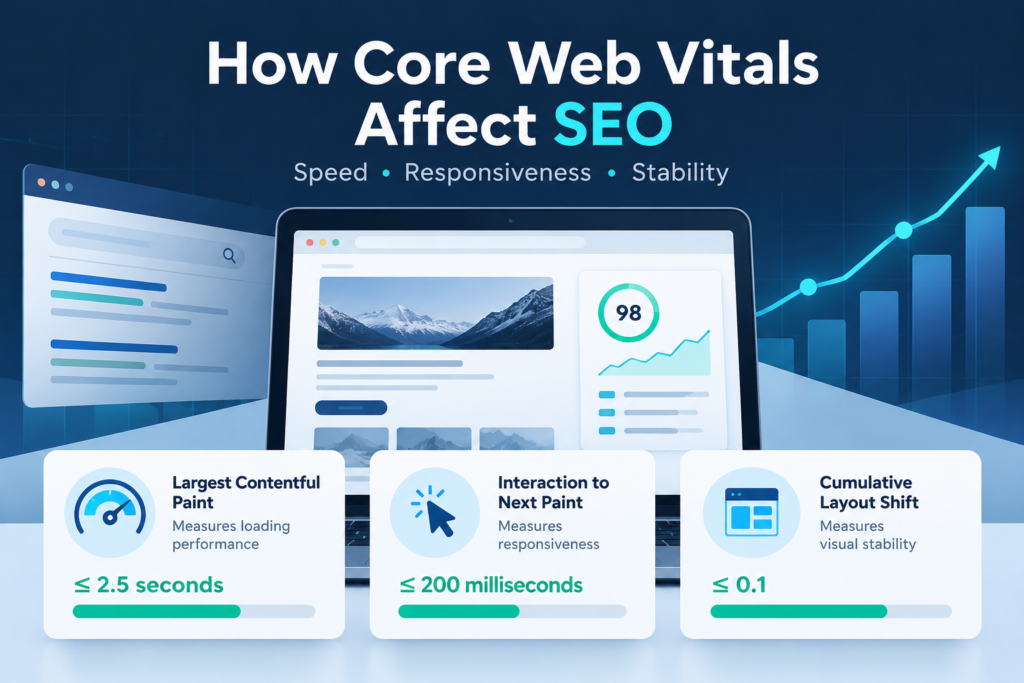
Core Web Vitals are Google’s key metrics for measuring three aspects of the user experience: loading performance, responsiveness, and visual stability. The current metrics are Largest Contentful Paint (LCP), Interaction to Next Paint (INP), and Cumulative Layout Shift (CLS).
Each metric measures a different aspect of how a web page behaves. Understanding them helps developers identify performance problems and prioritise improvements.
1. Largest Contentful Paint (LCP): Loading Performance
Largest Contentful Paint measures how long it takes for the largest visible image or text block in the viewport to render. In practical terms, it helps indicate when the main content of a page has become visible to the visitor.
Google’s recommended LCP target is 2.5 seconds or less. A slower result may indicate that the page’s main content takes too long to appear.
Common causes of poor LCP include:
- Large, unoptimised hero images or featured images.
- Slow server response times.
- Render-blocking CSS and JavaScript.
- Excessive third-party scripts.
- Incorrect image loading priorities.
- Slow delivery of fonts and other critical resources.
To improve LCP, compress and resize images, use modern image formats where appropriate, optimise server response times, and reduce unnecessary resources that delay the main content. A content delivery network (CDN) may also help deliver static assets more efficiently to visitors in different locations.
2. Interaction to Next Paint (INP): Responsiveness
Interaction to Next Paint measures how responsive a page feels when users interact with it. It considers interactions such as clicking a button, selecting a menu item, or using an interactive control, and measures the delay until the next visual update.
A good INP score is 200 milliseconds or less. Scores above this threshold may indicate that interactions feel slow or unresponsive.
Common causes of poor INP include:
- JavaScript tasks that block the browser’s main thread.
- Large scripts or excessive JavaScript execution.
- Heavy plugins and complex page-builder features.
- Expensive event handlers triggered by user interactions.
- Third-party scripts that compete for browser resources.
Developers can improve INP by reducing unnecessary JavaScript, breaking up long tasks, simplifying interactive components, and delaying non-essential scripts where appropriate. For WordPress websites, reviewing plugins and page-builder widgets can help identify features that add unnecessary processing.
3. Cumulative Layout Shift (CLS): Visual Stability
Cumulative Layout Shift measures unexpected movement of visible page elements while a page loads or during its lifecycle. For example, a visitor may begin reading a paragraph only for an advertisement or image to load and push the text down the screen.
A good CLS score is 0.1 or less. Lower scores indicate a more stable visual experience.
Common causes of poor CLS include:
- Images or videos without defined dimensions.
- Advertisements or embedded content inserted without reserved space.
- Web fonts that cause text to reflow.
- Content dynamically added above existing content.
- Late-loading banners, pop-ups, or interface elements.
To reduce layout shifts, define image dimensions or aspect ratios, reserve space for advertisements and embeds, and avoid inserting new content above existing content unless it is triggered by a user interaction. Font loading should also be managed carefully to minimise unexpected changes in text layout.
Core Web Vitals: Recommended Targets
| Metric | What It Measures | Good Result | Needs Improvement | Poor Result |
|---|---|---|---|---|
| Largest Contentful Paint (LCP) | Loading performance | 2.5 seconds or less | Over 2.5 to 4 seconds | Over 4 seconds |
| Interaction to Next Paint (INP) | Responsiveness | 200 ms or less | Over 200 to 500 ms | Over 500 ms |
| Cumulative Layout Shift (CLS) | Visual stability | 0.1 or less | Over 0.1 to 0.25 | Over 0.25 |
These thresholds are evaluated at the 75th percentile of real-world visits, with mobile and desktop experiences assessed separately. In other words, the objective is for at least 75% of visits to meet the good threshold for each metric.
How Do Core Web Vitals Affect SEO?
Core Web Vitals are relevant to SEO because they are part of the signals Google uses when assessing page experience. They help indicate whether a website provides a fast, responsive, and visually stable experience.
However, they should not be treated as a shortcut to higher rankings. Google’s systems aim to surface content that is relevant and helpful to the search query. A technically fast page with weak content may still perform poorly, while a highly relevant page may remain competitive even if some performance metrics need improvement.
1. They Contribute to Page Experience
A website that loads quickly and responds reliably can make it easier for visitors to access information and complete tasks. Core Web Vitals provide measurable indicators of this experience and form part of Google’s broader page-experience considerations.
Performance is only one part of the picture. A successful SEO strategy should also address useful content, search intent, mobile usability, HTTPS, accessibility, and clear navigation.
2. They Can Support Better User Engagement
Slow-loading pages, unresponsive controls, and unexpected layout shifts can interrupt the visitor’s journey. Improving these problems can make it easier for people to read content, browse products or services, and submit enquiries.
Better usability may support business outcomes such as enquiries, registrations, and purchases. These benefits should be measured using analytics and conversion data rather than assuming that a better Core Web Vitals score automatically produces higher engagement or rankings.
3. They Matter on Mobile Devices
Mobile visitors may experience performance problems more often because of slower network connections or devices with limited processing power. A page that performs well on a desktop computer may still be slow or difficult to use on a mobile phone.
Test both mobile and desktop performance. Pay particular attention to large images, navigation menus, sticky headers, pop-ups, third-party scripts, and page-builder components that may behave differently on smaller screens.
4. They Help Identify Technical SEO Issues
Core Web Vitals testing can reveal underlying technical problems, including slow server responses, inefficient resource loading, heavy scripts, and unstable layouts. Resolving these issues can improve the overall quality of the website and make it more reliable for visitors.
Nevertheless, passing Core Web Vitals assessments does not guarantee indexing, stronger rankings, or top placement in search results. Performance improvements should complement—not replace—technical SEO, content optimisation, and a clear site structure.
How to Check Your Website’s Core Web Vitals
Several tools can help you measure performance and identify opportunities for improvement.
Google PageSpeed Insights
Google PageSpeed Insights provides performance diagnostics for mobile and desktop pages. It can show real-user data when sufficient field data is available, alongside laboratory test results and suggestions for improvement.
Google Search Console
The Google Search Console Core Web Vitals report groups eligible URLs according to their reported performance. It can help website owners identify groups of pages with similar issues and monitor whether fixes improve their reported status over time.
Chrome DevTools and Lighthouse
Chrome DevTools and Lighthouse help developers investigate rendering problems, JavaScript execution, layout shifts, and other performance bottlenecks during testing.
Remember that a Lighthouse laboratory test cannot directly measure real-user INP without actual interactions. Total Blocking Time (TBT) can help identify potential responsiveness problems in laboratory testing, but it is not a substitute for field INP data.
How to Improve Core Web Vitals on a WordPress Website
WordPress websites can develop performance issues when themes, plugins, page builders, images, and scripts add more work than the browser needs to perform. The best approach is to measure first, identify the main bottlenecks, and apply targeted changes.
1. Optimise Images
Large images can delay the rendering of the main content, especially on mobile devices. Resize images to suit their display dimensions, compress them, and consider WebP or AVIF where supported.
Do not automatically lazy-load the main above-the-fold image if it is the LCP element. Prioritise its discovery and loading when appropriate, while lazy-loading images that are below the fold.
2. Review Plugins and Page Builders
Audit your installed plugins and page-builder features. Remove unused functionality and investigate plugins that load scripts or styles across the entire website when they are only required on specific pages.
Before removing or replacing a plugin, confirm that the website does not depend on it for important functionality. Test changes on a staging site when possible.
3. Improve Caching and Server Response Times
Page caching, object caching where appropriate, database optimisation, and efficient hosting can help reduce server response times. A CDN may also improve the delivery of static assets to visitors who are far from the origin server.
For websites using WP Fastest Cache or a similar caching plugin, configure caching carefully and verify that cached pages reflect recent updates. Avoid enabling every optimisation option at once; some combinations of minification, script delay, or CSS optimisation can break site functionality.
4. Reduce Unnecessary JavaScript and CSS
Remove unused scripts and styles where practical, defer non-critical resources, and reduce long-running JavaScript tasks. Focus on resources that block rendering or interfere with user interactions rather than simply aiming for the smallest possible file size.
Third-party tools—including chat widgets, analytics tags, advertising scripts, and social media embeds—should also be reviewed. Keep the tools that provide clear value and minimise their impact on page performance.
5. Prevent Unexpected Layout Shifts
Set image dimensions, reserve space for embedded media, and make sure banners or other dynamic elements do not unexpectedly push content around. Test font loading and responsive layouts to ensure that text and interface elements remain stable.
6. Test After Every Major Change
Retest important page types after changing the theme, adding a plugin, updating a page builder, or modifying caching settings. A change that improves one page may affect another, so test representative home, category, article, product, and landing pages where relevant.
Common Core Web Vitals Mistakes to Avoid
- Chasing a perfect score: A score of 100 is not a ranking guarantee. Prioritise meaningful user-experience improvements.
- Relying only on laboratory tests: Lab tests help diagnose problems, but real-user field data is essential for understanding actual visitor experiences.
- Lazy-loading every image: Lazy-loading an important above-the-fold image can delay LCP.
- Installing too many optimisation plugins: Overlapping features may create conflicts or unexpected behaviour.
- Ignoring mobile performance: Desktop results do not necessarily reflect the experience of mobile visitors.
- Changing several settings at once: Make targeted changes so you can identify which adjustment helped or caused a problem.
Conclusion
Core Web Vitals are an important part of building a website that performs well for both visitors and search engines. By improving loading speed, responsiveness, and visual stability, businesses can reduce technical friction and create a more dependable browsing experience.
For SEO, the best approach is to treat Core Web Vitals as one part of a broader optimisation strategy. Combine performance improvements with helpful content, sound technical SEO, mobile usability, and clear navigation. Measure real-user results, prioritise the problems that affect visitors most, and keep testing as your website evolves.
Frequently Asked Questions
Do Core Web Vitals directly affect Google rankings?
Core Web Vitals are used by Google’s ranking systems as part of page-experience signals. However, they are not the only ranking consideration, and good scores do not guarantee higher rankings.
What are the three Core Web Vitals metrics?
The three current metrics are Largest Contentful Paint (LCP), Interaction to Next Paint (INP), and Cumulative Layout Shift (CLS). They measure loading performance, responsiveness, and visual stability, respectively.
What is a good Core Web Vitals score?
A page meets the recommended good thresholds when its LCP is 2.5 seconds or less, INP is 200 milliseconds or less, and CLS is 0.1 or less, assessed at the 75th percentile of real-user visits for mobile and desktop separately.
Can a WordPress plugin improve Core Web Vitals?
Caching, image optimisation, and asset optimisation plugins can help, depending on the site’s problems and configuration. However, no single plugin can fix every performance issue. Testing and targeted optimisation are still necessary.
How often should Core Web Vitals be checked?
Check performance after major website changes and review field data regularly. Monitor important landing pages and templates, particularly after theme updates, plugin changes, or significant content additions.